
You can permanently delete your account yourself in Settings > Workplace (1) > General (2) > Permanently delete your account (3). Only the account owner can do it, our support can't delete it for you, and all data is deleted immediately and can't be restored. If you sign in with Google or Apple, switch to username and password first.
Important — General, not Security: The option to permanently delete your account is on the General tab (under Workplace). It is not in Security and privacy — a common place people look by mistake.
We've broken the article into a few sections:
How to delete your account
Ensure you are signed in to your Smartsupp Dashboard before proceeding with these steps.
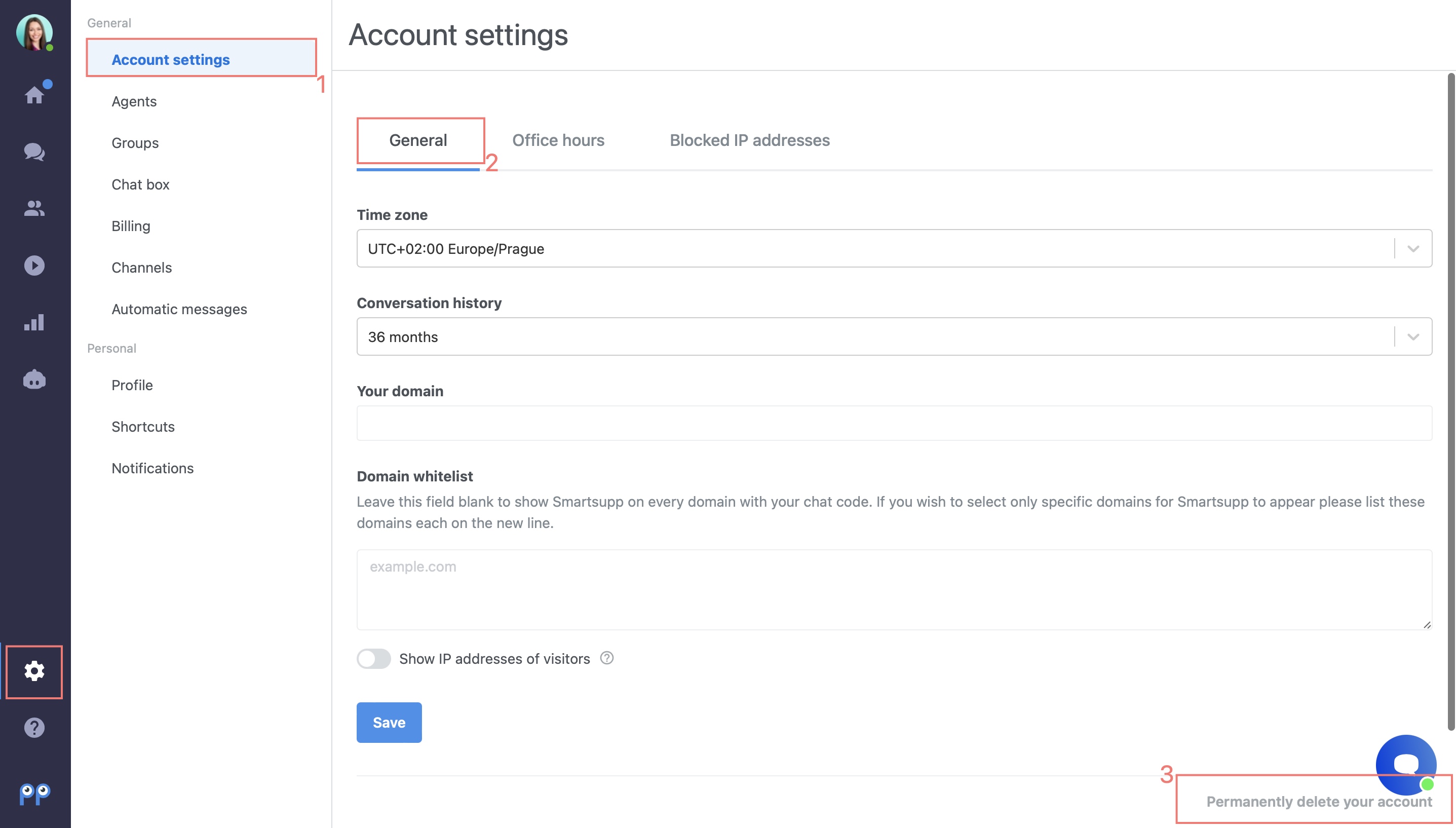
Note: If you use Google and Apple to sign in, you can't delete your Smartsupp account. If you want to delete it, please set "default" (username + password) as the authorization method. When deleting the account, you will be asked to enter the default password.
Additionally, Smartsupp support cannot delete accounts on behalf of users for security reasons. Only verified account owners can perform this action.
What to Do If You Don’t Have Access to the Owner’s Email
If you no longer have access to the email associated with the account, you can request an ownership transfer. To do this, you will need to verify your ownership of the account. Provide the following information to Smartsupp support:
Proof of account ownership, such as a recent Smartsupp invoice (PDF or invoice number).
The new owner’s email address.
The domain associated with the account. Once ownership is transferred to the new email, you can sign in with the updated email and proceed with the deletion steps outlined above.
Warning: By deleting your account, all of the data are immediately deleted. This action is irreversible.
This includes all conversations, statistics, settings, and any other data associated with your account.
What's next?
How to cancel your subscription or downgrade your plan — how to cancel your subscription or switch to a lower plan.
What happens to my account and data when my subscription ends? — what happens to your account and data when your subscription ends.
Data privacy & GDPR — how Smartsupp handles personal data and GDPR.