
Note: Old advanced settings are available only for selected users who created an account in May 2021 and earlier.
When you click on the automatic message situated in the section Soon moved the old advanced settings will appear.
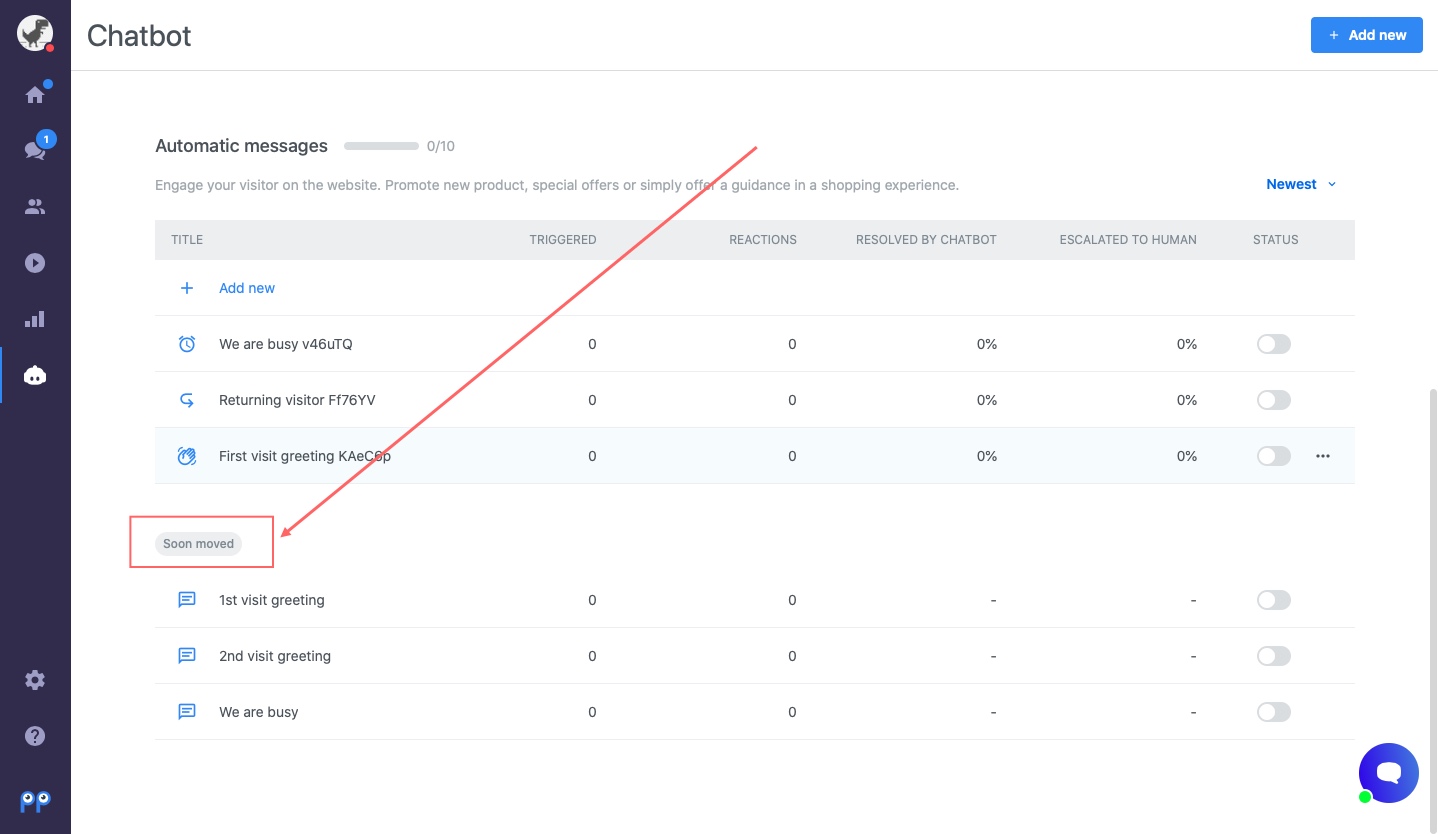
In the advanced settings, you can choose the condition in which the message is sent (Launch message) and the way of evaluating conditions (Send message to visitor if). You can also choose more conditions from the list.
Condition | Possible operators | Description |
Launch message | When the chat box is loaded | An automatic message is sent when Smartsupp is detected on the website. |
When a visitor sends a message | The message is triggered when your visitor sends a message. | |
When a visitor opens a chat box | Messages are triggered when your visitor opens a chat box. | |
Send message to visitor if | All conditions are met | All conditions must be met to trigger the message (e.g., A and B and C). |
Any condition is met | At least one condition must be met (e.g., A or B or C). |
List of advanced conditions
In addition to the simple conditions, there are advanced conditions and operators available.
Condition | Possible operators | Value example | Description |
URL of website | = equals != doesn’t equal
? contains
!? doesn’t contain
$ matches regular expression
| The website address visited by the visitor. The condition is met if the URL contains the entered text, which can be anywhere in the URL. | |
Web page title | = equals != doesn’t equal
? contains
!? doesn’t contain
$ matches regular expression
| Canon cameras | My e-shop | The title of web page that the visitor is currently browsing. It is shown in the browser tab. The value must be exactly the same as the title.
|
Referer (source) | = equals != doesn’t equal
? contains
!? doesn’t contain
$ matches regular expression
| google.com | The website from which the visitor came to your website (e.g., a search engine, blog, article, or marketing campaign). For your info, the referrer may not always be available (for example, if the visitor types the URL directly into their browser). Some websites also don’t send referrer info.
|
Number of visits | = equals != doesn’t equal
< is fewer than
> is more than
<= is fewer than or equals
>= is more than or equals
| 2 | How many times a visitor has been on your website. This information is stored in their cookies. We recommend testing automatic messages in an incognito window. |
Number of chats | = equals != doesn’t equal
< is fewer than
> is more than
<= is fewer than or equals
>= is more than or equals
| 1 | The number of chats with the visitor. |
Visitor sent message | is true is false
| It’s triggered when visitor sends a message (is true) or not (is false). | |
Visitor is/was served | is true is false
| A visitor is served when an operator sends a message to them. Is true means this has happened, and is false means it hasn’t. | |
IP address | = equals != doesn’t equal
? contains
!? doesn’t contain
$ matches regular expression
| 88.90.91.92 | The visitor's IP address. |
City | = equals != doesn’t equal
? contains
!? doesn’t contain
$ matches regular expression
| Brno | The visitor's city. It's based on Maxmind geolocation data. Locations of some visitors might be inaccurate, and small cities in particular might be shown as bigger cities in their vicinity. Inaccurate information may also be shown for visitors using mobile data. |
Country code | = equals != doesn’t equal
? contains
!? doesn’t contain
$ matches regular expression
| DE, IT, ES | The visitor's country code in ISO 3166-1 alpha-2 form. The list of all countries and their codes can be found here:https://en.wikipedia.org/wiki/ISO_3166-1_alpha-2#Officially_assigned_code_elements |
Group | = equals != doesn’t equal
| The visitor's group. (Only Pro packages can use groups.) | |
Hour of the day | = equals != doesn’t equal
< is earlier than
> is later than
<= is earlier than or equals
>= is later than or equals
| 0-23 | The time when the automatic message is triggered. |
Day of the week | = equals != doesn’t equal
< is earlier than
> is later than
<= is earlier than or equals
>= is later than or equals
| Monday - Sunday | The day of the week when the automatic message is triggered. |
Month | = equals != doesn’t equal
< is earlier than
> is later than
<= is earlier than or equals
>= is later than or equals
| January-December | The month when the automatic message is triggered. |
Browser | = equals != doesn’t equal
? contains
!? doesn’t contain
$ matches regular expression
| Chrome | The visitor's browser. The value is the same as it is in the user info panel in the visitor’s chat detail. |
Operating system | = equals != doesn’t equal
? contains
!? doesn’t contain
$ matches regular expression
| Windows, OS X, Android | The visitor's operating system. The value is the same as it is in the user info panel in the visitor’s chat detail. |
Platform | = equals != doesn’t equal
? contains
!? doesn’t contain
$ matches regular expression
| Windows, Apple Mac | The visitor's platform |
Visitor received an automatic message | is true is false
| Determine whether or not a visitor received automatic message. | |
Chatbox status | online offline
| Determine whether the chat box is in online or offline mode. |